A One-Scene Rewatch for Following the Edit
A one-scene rewatch helps you notice shot length, cut points, and shifts in viewpoint, giving you a clearer account of how editing organizes a scene.
Editing becomes easier to describe when you follow one scene’s changing rhythm instead of trying to account for every choice at once. A short rewatch can show how shot duration, cut placement, and reaction shots shape the scene’s pace and emphasis.
Choose a scene with a change in rhythm
Pick a brief passage where the pace shifts: perhaps a conversation moves from careful pauses to quick replies, or a person crosses a room and stops at a doorway. Look for a scene with a recognizable start and finish, so you can compare its opening pattern with its ending.
Use a film or episode you can pause and replay. A streaming player’s progress bar is enough to return to the passage. You do not need a scene you already know by heart; familiarity can pull your attention toward what happens next rather than how the sequence is assembled.
Keep the task narrow. Watch for rhythm and emphasis, not every lighting choice, sound cue, or possible symbol. A handful of precise notes will tell you more than a page of impressions.
Record the scene’s first rhythm
Watch once without pausing. Notice whether the scene feels measured, brisk, or uneven, and where that feeling changes. Afterward, write down the action in plain terms and identify the point where the rhythm seems to shift.
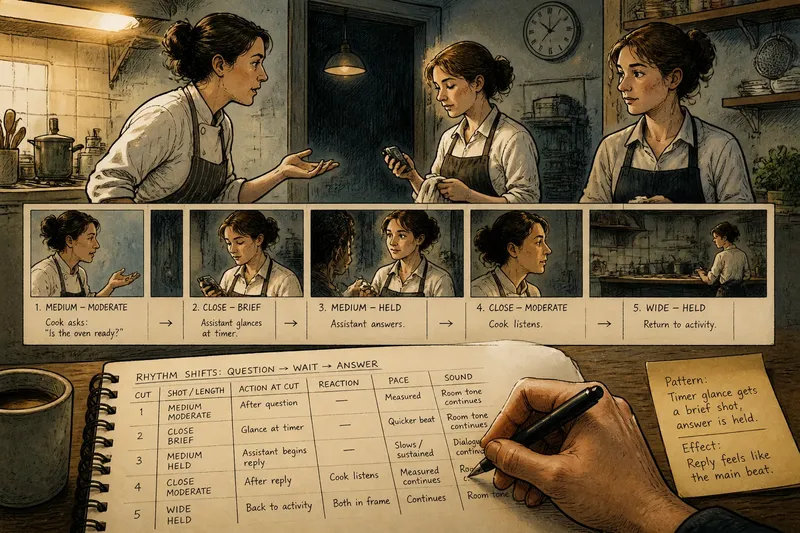
For example, imagine an invented scene in which a cook asks an assistant whether the oven is ready. The assistant pauses, checks a timer, and answers. On the first viewing, note that the question is followed by a wait and a small action before the reply. This gives you a sequence to examine without assigning a motive to the pause.
Map the cuts and their timing
Watch again and mark each change to a new shot. Next to each mark, describe the visible action and label the shot’s length as brief, moderate, or held. Compare neighboring shots rather than trying to establish an exact duration.
- Cut point: If the image changes to a new shot, add a mark; if the image continues while a person moves, leave it unmarked.
- Shot length: If a shot feels noticeably shorter or longer than the one beside it, record that contrast; otherwise, note that their pace feels similar.
- Action at the cut: If the cut falls during a gesture, describe the gesture; if it falls after a line or pause, record that instead.
- Reaction shot: If the image leaves the speaker for a listener, note the listener’s visible response; if it stays with the speaker, record what the speaker does.
- Change in pace: If several brief shots gather around one moment, mark where that run begins; if shot lengths remain steady, note the continuity.
- Sound across the cut: If dialogue or room sound continues into the next image, note the overlap; if the sound changes with the image, record that shift.
Say you return to the invented kitchen scene and find that the question is shown in a medium view, the assistant’s glance at the timer gets a brief shot, and the reply arrives in a held view. Your notes would show that the edit gives the glance a quick beat and lets the answer occupy more screen time. That is a description of the sequence, not proof that the assistant is worried or evasive.
Read the pattern without turning it into a code
Compare your marks with the first impression of rhythm. A run of short shots may make an exchange feel quick, but the actors’ delivery and the sound can pull in another direction. A longer shot may leave room for a response, or make a pause feel exposed. Treat the pattern as one contributor to the scene’s effect, not a fixed formula.
Look at what the edit gives time to. Does a listener’s reaction remain on screen after a line? Does the scene cut away before an answer, or hold on the person who asked? These choices can give one beat more weight than another, even when the dialogue itself remains unchanged.
It is not worth pausing after every frame or timing each shot to the second. That precision can distract from the relation between neighboring shots, which is usually the more useful observation for a first pass.
Which editing details are worth noting?
How do I tell a cut from movement inside a shot?
A cut changes the image to a new shot. If a person crosses the room while the view continues without changing, that movement does not add a cut.
What should I do if the scene has many quick cuts?
Group the quick changes into a short run and note where it begins and ends. If counting distracts you, record only the cuts that shift attention to a different person or action.
How can I describe a shot’s effect without overreading it?
Name the visible choice and its immediate effect on attention: for instance, the edit holds on the listener after the question. If you offer an interpretation, connect it to that pattern and leave room for acting, dialogue, and sound to contribute.
Does a longer shot always slow a scene down?
No. A held shot can make a pause feel tense, awkward, or simply sustained, depending on what happens within it and what the soundtrack is doing. Record the impression you had, then point to the details that shaped it.
Write one account of the edit
Finish with a sentence about a pattern you can point to: “The scene gives the assistant’s glance a brief shot, then holds on the answer.” If you add an effect, keep it tied to what the sequence does: “That pause makes the answer feel more exposed to me.” The first sentence describes the edit; the second identifies your response.
For the invented kitchen scene, the complete note could read: “The assistant’s timer glance gets a brief shot, followed by a held view for the answer, so the reply feels like the scene’s main beat.” The input was the question, glance, and reply; the viewing pass identified their shot pattern; the result is a specific account of emphasis without deciding what the assistant secretly feels.
Keep the note with the scene’s title or episode and the point where it begins. If you revisit it, you can compare a new impression with the pattern you recorded. A good one-scene rewatch leaves you with a clearer description of the edit—and enough attention left to enjoy the scene itself.